
GK Technology Podcast
Ag Geek Speak: the precision ag podcast from GK Technology.
Host Sarah Lovas talks precision agriculture, ag mapping, agronomy, and drainage with the people doing the work. Full interview episodes and short Tiny Bytes explainers, all in one feed.

GK Technology Podcast
Ag Geek Speak: the precision ag podcast from GK Technology.
Host Sarah Lovas talks precision agriculture, ag mapping, agronomy, and drainage with the people doing the work. Full interview episodes and short Tiny Bytes explainers, all in one feed.
About the show
One podcast, two formats.
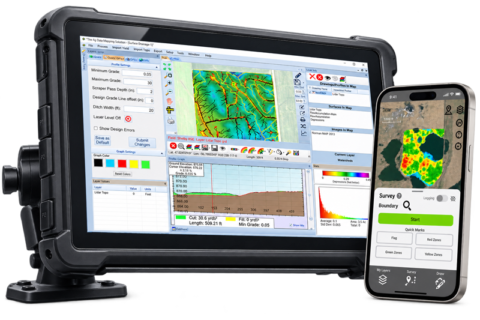
Ag Geek Speak is the podcast from GK Technology, the precision ag software and mapping company in Halstad, Minnesota. Every episode is published to one feed, so you get both formats wherever you listen.

Interviews and deep dives
Long-form conversations with agronomists, soil scientists, software developers, and growers on precision agriculture: variable rate, soil sampling, imagery, drainage, AI on the farm, and the people building the tools.
Browse full episodes
One precision ag topic, explained
Tiny Bytes are the short episodes of Ag Geek Speak. Each one answers a single question, from what a shapefile is to how Olsen, Bray, and Mehlich-3 phosphorus tests differ. They are numbered with a .5 between the full episodes.
Browse Tiny Bytes
Your host
Sarah Lovas is a member of the GK Technology team. She hosts every episode, brings in guests from across the industry, and takes topic requests from listeners through the form below.
Episodes
Every episode, newest first.
Filter by format, open the show notes, read the transcript, or press play. New episodes appear here automatically when they publish.
Showing 13 to 24 of 41 episodesNewest first

15.5 Precision Composite Soil Sampling Explained
We unpack why “precision composite soil sampling” isn’t a contradiction and show how GPS-marked points turn an old method into a reliable trend tool. We cover workflows, gear, timing, and when shifting…
Show notes
We unpack why “precision composite soil sampling” isn’t a contradiction and show how GPS-marked points turn an old method into a reliable trend tool. We cover workflows, gear, timing, and when shifting results should push you toward zones.
In this episode we discuss
• Pre‑GPS composite sampling and its limits
• Marking exact GPS points for repeatability
• Keeping post‑harvest or spring timing consistent
• Tracking year‑over‑year P, K and pH trends
• When composites signal a move to zones
• Benchmarks versus wider composite coverage
• Core counts for quarters and half sections
• Gear tips: external GPS pucks and apps
• Faster fieldwork once points are mapped
• Starting with GK Field Mapper and ADMS exports
More info about GK Field Mapper here: https://gktechinc.com/gk_field_mapper/
Tune in next time for a tiny bite of knowledge from GK Technology, where we have a map and an app for that!
https://gktechinc.com/

14.5 From Prairie Black To Red Dirt: A Tour Of Soil Orders
We break down soil orders like a field guide, linking what you see in a soil profile to how soils behave and how to manage them. From prairie-black mollisols to red-dirt ultisols,…
Show notes
We break down soil orders like a field guide, linking what you see in a soil profile to how soils behave and how to manage them. From prairie-black mollisols to red-dirt ultisols, we share traits, regions, and practical tips growers can use today.
• soil taxonomy as a practical framework
• mollisols and their dark, organic-rich surface
• vertisols with shrink–swell clays and timing risks
• spodosols in conifer forests with leached E horizons
• alfisols, clay accumulation, and hardpan concerns
• histosols in peat bogs with high organic matter
• ultisols in the South, iron oxides, and low-activity clays
• regional patterns across the Upper Midwest to the Southeast
• field tips for digging, observing, and managing horizons
Tune in next time for a Tiny Byte of knowledge from GK Technology, where we have a map and an app for that!
https://gktechinc.com/
https://gktechinc.com/

12.5 Tiny Bytes: Understanding Bulk Density: Why Space Matters in Your Soil
Soil is more than just what we see on the surface, on average consisting of 45% mineral components, 5% organic matter, 25% water, and 25% air, with bulk density measuring how much…
Show notes
Soil is more than just what we see on the surface, on average consisting of 45% mineral components, 5% organic matter, 25% water, and 25% air, with bulk density measuring how much dry soil weighs per volume.
• Bulk density indicates the space available in soil for air and water
• Sandy soils counterintuitively have higher bulk density than clay soils
• Clay soils typically contain more organic matter which contributes to greater pore spaces
• Bulk density increases as you go deeper into the soil profile
• Tillage initially reduces bulk density but destroys aggregate structure
• No-till transitions require time for new aggregate formation
• Compacted soils with high bulk density limit root exploration
• The ideal soil provides adequate pore space for root growth
• Calculating total nutrients requires understanding soil bulk density
More on measuring bulk density and bulk density as a soil health indicator: https://www.nrcs.usda.gov/sites/default/files/2023-01/Soil%20Quality-Indicators-Bulk%20Density.pdf
Join us for our next Tiny Bytes!
https://gktechinc.com/
https://gktechinc.com/

11.5 Tiny Bytes: NDVI: Turning Plant Color into Actionable Farm Data
NDVI (Normalized Difference Vegetative Index) helps farmers detect how green and/or productive different areas of their fields are by measuring the ratio of near-infrared to red light reflected from plant canopies. This…
Show notes
NDVI (Normalized Difference Vegetative Index) helps farmers detect how green and/or productive different areas of their fields are by measuring the ratio of near-infrared to red light reflected from plant canopies. This technology creates reliable productivity zone maps when analyzed consistently over multiple growing seasons, enabling targeted input management across variable field conditions.
In this Tiny Byte Sarah and Jodi cover:
• NDVI measures plant canopy density by comparing near-infrared light reflection to red light absorption
• Chlorophyll absorbs visible light while plant cell structures reflect near-infrared light
• NDVI values range from -1 to 1 (or ~0-100 in ADMS) with higher values indicating denser vegetation
• Creating reliable management zones requires multiple years of imagery, not just single snapshots
• Best imagery comes from periods when crop canopy is developing or starting to senesce
• NDVI data often correlates with yield potential and can identify consistently productive field areas
• Zone management allows targeted input application based on productivity potential
• The most valuable NDVI images show variation in greenness rather than complete saturation
Check out our backlog episode "Choosing Quality Imagery" in Season 1 for more information on selecting the best imagery for creating management zones. https://www.buzzsprout.com/2297340/episodes/16135793
https://gktechinc.com/
https://gktechinc.com/

10.5 Tiny Bytes: What's the Deal with UTM?
Using the correct UTM (Universal Transverse Mercator) zone is crucial when working with GIS data mapped to a UTM zone. We explain how projections work to translate locations from Earth's spherical surface…
Show notes
Using the correct UTM (Universal Transverse Mercator) zone is crucial when working with GIS data mapped to a UTM zone. We explain how projections work to translate locations from Earth's spherical surface to flat maps, and why UTM zones are critical for accurate agricultural mapping.
• UTM divides Earth into 60 zones, each six degrees of longitude wide
• UTM choice errors cause maps to appear in completely wrong locations, like oceans
• Creating maps in the wrong UTM zone leads to unusable prescriptions for field operations
• Maps created in one UTM zone but opened in another will show incorrect positions
• Farms located on UTM zone boundaries may encounter projection issues more frequently
• Always verify your UTM zone settings when working in mapping software
• Turn on background maps to confirm your fields are projecting in the correct location
• Reprojection tools in ADMS can help fix UTM errors
Avoid the sharks and floaties, check your UTM!
https://gktechinc.com/
https://gktechinc.com/

9.5 Tiny Bytes: Variable Yield Goals: The Foundation of Smart Farming
Precision agriculture focuses on treating different parts of a field according to their unique yield potential instead of applying the same approach everywhere. Variable rate applications start with establishing realistic yield goals…
Show notes
Precision agriculture focuses on treating different parts of a field according to their unique yield potential instead of applying the same approach everywhere. Variable rate applications start with establishing realistic yield goals for different areas within a field based on their consistent performance patterns.
In this episode, Sarah and Jodi discuss:
• Using historical yield data to determine which areas consistently yield higher or lower
• Combining yield history with grid soil sampling data to create targeted fertilizer applications
• Assigning variable rate yield goals by zone when managing variability
• Being realistic about low-yield areas that consistently underperform
• Recognizing how nutrients accumulate in low-yield areas while being depleted in high-production zones
• Creating variable rate maps even with just composite soil samples by setting different yield goals
• Understanding precision agriculture is primarily about efficiency, not just yield maximization
• Managing costs by reducing inputs where appropriate while giving high-producing areas what they need
https://gktechinc.com/
https://gktechinc.com/

8.5 Tiny Bytes: On the Root of a Drive
We tackle a common technical prescription writing question in this Tiny Byte: what does it mean to place a prescription on the root of a drive and why does it matter. Understanding…
Show notes
We tackle a common technical prescription writing question in this Tiny Byte: what does it mean to place a prescription on the root of a drive and why does it matter. Understanding this simple concept can solve many frustrating issues when loading prescriptions onto different monitors.
• The "root" of a drive is the main directory—the blank space you see when first opening the drive
• Different farm equipment requires prescription files in specific locations
• Page 203 of the 2025 ADMS User Manual lists out where prescriptions need to be saved on different monitors
• Some monitors require files directly on the root (no folders)
• The slash (/) in file paths just indicates folder structure
• Never use special characters in file or folder names—stick to letters, numbers, and dashes
• Proper file placement ensures controllers can find and use your prescription files
https://gktechinc.com/
https://gktechinc.com/

7.5 Tiny Bytes: From Bits to Petabytes: Understanding Computer Storage
We explore the fundamentals of digital storage and how it powers precision agriculture, covering basic bytes to the massive petabyte servers at GK Technology that store agricultural imagery and data.• A byte…
Show notes
We explore the fundamentals of digital storage and how it powers precision agriculture, covering basic bytes to the massive petabyte servers at GK Technology that store agricultural imagery and data.
• A byte equals eight binary bits and typically represents a single character or piece of data in computer language
• Digital storage units progress from kilobytes (thousand) to megabytes (million) to gigabytes (billion) to terabytes (trillion) to petabytes (thousand terabytes)
• GK Technology's Halstead office maintains a petabyte of storage containing agricultural data for most of the United States and three Canadian provinces
• Storage includes shapefile formats, NAIP imagery, Lidar data, and two satellite libraries: Landsat (30m resolution back to 1984) and Sentinel (10m resolution from 2016)
• Precision ag software users access this massive data repository when creating drainage maps or automated management zones
• Higher resolution imagery like drone photos requires significantly more storage space, creating challenges for agricultural data management
https://gktechinc.com/
https://gktechinc.com/

6.5 Tiny Bytes: Plant Tissue Testing 101
Plant tissue testing offers farmers and consultants valuable insight into crop nutrient status and helps diagnose field issues when properly conducted. We explain the science behind tissue testing and share practical tips…
Show notes
Plant tissue testing offers farmers and consultants valuable insight into crop nutrient status and helps diagnose field issues when properly conducted. We explain the science behind tissue testing and share practical tips for getting actionable results.
• Tissue testing can help to evaluate nutrient status to understand crop health at various growth stages
• Troubleshoot field issues by comparing samples from healthy and problematic areas
• It is important to sample the correct plant part according to the crop's growth stage
• Mobile nutrients show deficiency in lower leaves while immobile nutrients affect upper leaves first
• Remember to remove soil contamination from samples, especially when checking iron levels
• Tissue tests can help to identify the problem while soil tests help determine corrective actions
• Have a specific goal in mind before collecting tissue samples
• Take both tissue and soil samples when diagnosing nutrient deficiencies
https://gktechinc.com/

4.5 Tiny Bytes: Field Boundaries, the Cookie Cutters of Precision Ag
Field boundaries serve as the digital cookie cutters of precision agriculture, defining where field operations begin and end for optimal resource management. Understanding their purpose and creation methods allows consultants and growers…
Show notes
Field boundaries serve as the digital cookie cutters of precision agriculture, defining where field operations begin and end for optimal resource management. Understanding their purpose and creation methods allows consultants and growers to implement more precise applications and better predict input needs.
• Boundaries determine where equipment turns on and off during field operations
• Accurate boundaries help predict input requirements and prevent waste
• Vector files (typically shape files) define the digital representation of field boundaries
• Water management requires different boundary considerations than nutrient management
• Creating boundaries can be done through driven collection with RTK-enabled vehicles
• Drawing boundaries in GIS software requires well georeferenced backgrounds like NAIP imagery
• Common Land Units (CLUs) provide a starting point but often lack precision
• Moving vertices allows for refinement of boundary polygons
• Accurate boundaries serve as the foundation for all precision agriculture mapping
Connect with GK Technology for all your precision agriculture needs - we have a map and an app for that!
https://gktechinc.com/
https://gktechinc.com/

3.5 Tiny Bytes: Understanding Plant Nutrient Mobility
Awareness of nutrient mobility in plants drastically improves in-field diagnosis of crop issues. In this episode, we dive deep into plant nutrient mobility and how nutrient mobility impacts visual symptoms in the…
Show notes
Awareness of nutrient mobility in plants drastically improves in-field diagnosis of crop issues. In this episode, we dive deep into plant nutrient mobility and how nutrient mobility impacts visual symptoms in the field.
• Discussion on the concept of nutrient mobility
• Insights into mobile vs. immobile nutrient deficiencies
• Importance of tissue testing for accurate diagnoses
Relatively immobile nutrients (symptoms will appear on newest leaf tissue): S, Zn, Fe, Cu, B, Ca, Mn, Mo, Ni
Relatively mobile nutrients (symptoms will appear on oldest leaf tissue): N, P, K, Mg
Don't forget to subscribe and share your thoughts on social media!
Cover art diagram courtesy of the 4R Plant Nutrition Manual, IPNI 2012 (https://www.canr.msu.edu/news/identifying_nutrient_deficiency_symptoms_in_field_crops)
https://gktechinc.com/
https://gktechinc.com/

2.5 Tiny Bytes: Plant Nutrients and How They Move (or Don't) in the Soil
Jodi and Sarah explore the crucial distinction between mobile and non-mobile nutrients in soil. Understanding how these nutrients behave not only aids in effective soil sampling but also enhances soil fertility management,…
Show notes
Jodi and Sarah explore the crucial distinction between mobile and non-mobile nutrients in soil. Understanding how these nutrients behave not only aids in effective soil sampling but also enhances soil fertility management, providing fertilizer users with the knowledge they need to maximize returns on their fertilizer dollars.
They cover
• Mobile vs. non-mobile nutrients
• Nutrient behavior based on soil charge
• Cation exchange capacity (CEC) and nutrient adhesion
• Sampling strategies for mobile vs. non-mobile nutrients
https://gktechinc.com/
Request an ag topic
Ask Sarah.
Do you have an ag related topic you would like Sarah to discuss on the podcast? Send it in with the form.
Do you have an ag related topic you would like Sarah to discuss?
Questions
About Ag Geek Speak.
Ag Geek Speak is the podcast from GK Technology Inc, the precision ag software and mapping company in Halstad, Minnesota. Team member Sarah Lovas talks about precision agriculture, agriculture mapping, agronomy, and drainage with guests from across the industry.
Tiny Bytes are the short episodes of Ag Geek Speak, usually 7 to 15 minutes, each covering one precision ag topic such as NDVI, shapefiles, soil sampling, or GPS versus GNSS. They are numbered with a .5 (for example 6.5) and sit between the full episodes in the same feed. Use the Tiny Bytes tab above to see only those.
Right here on this page, on Buzzsprout, on YouTube, or in any podcast app by adding the RSS feed.
Yes. Every episode has a transcript. Use the "Read transcript" link under any episode above.
Use the Ask Sarah form on this page. Tell her the ag topic you want covered and she may feature it in a future episode.
Tiny Bytes now live on this page with the full episodes. Select the Tiny Bytes tab to see only the short episodes.
Contact
Get in touch with GK.
Tell us about your operation and what you're trying to solve.
Halstad, MNA real person on the Halstad team reviews every message.
Call
Follow GK
Find us
GK Technology, Inc.
305 5th Street East
Halstad, MN 56548